Why not just Place the Word file?

- Published
- Reading
- 3 min read
- Written by
- NSi4
Every financial printer we show Keyline Studio to asks the same question first. InDesign already imports Word. Why not use File › Place and be done?
The short answer: Place copies what the author typed. Keyline Studio sets what the author meant. It reads the Word file the author sent, applies your own InDesign template's rules, and builds a native InDesign document that your typesetters finish as they do today.
Here is the difference on four cases from our test set. Each pair shows the same rows: first InDesign's Place, then the Keyline Studio draft. The companies are invented.
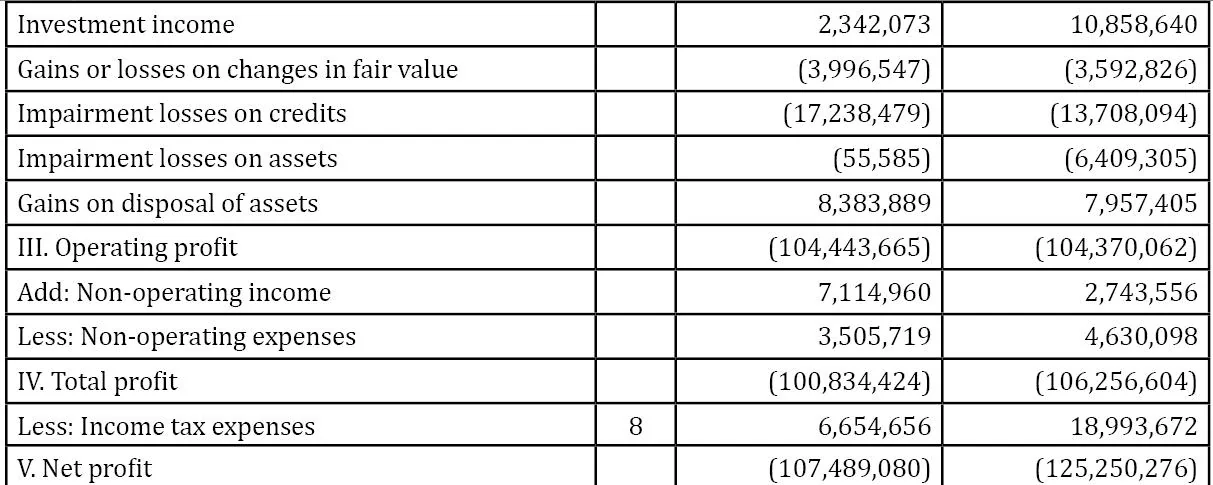
1. Figures align on their digits
InDesign Place
Keyline Studio draft
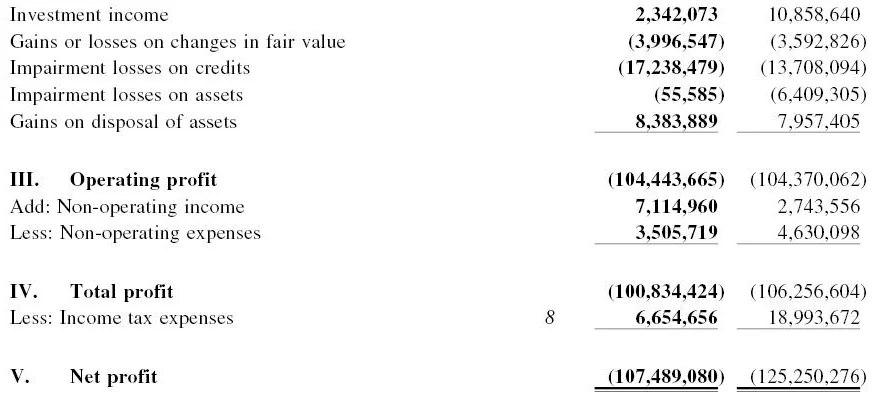
Place keeps every Word cell as a boxed cell, and each bracket pushes its figure out of line. In the Keyline Studio draft, every figure ends on the same line and the brackets hang outside it.
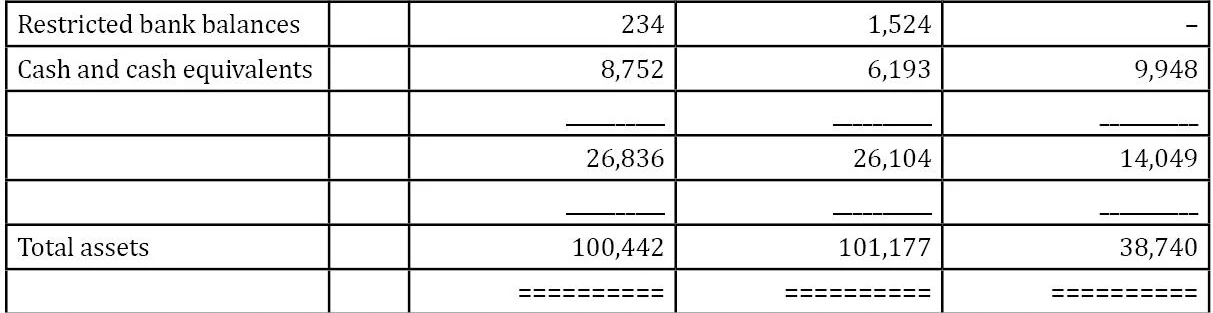
2. Typed rules come out, real rules go in
InDesign Place
Keyline Studio draft

Authors draw totals with underscores and equals signs. Place keeps them as rows of characters. Keyline Studio removes them and draws a single rule above the subtotal and a double rule under the total.
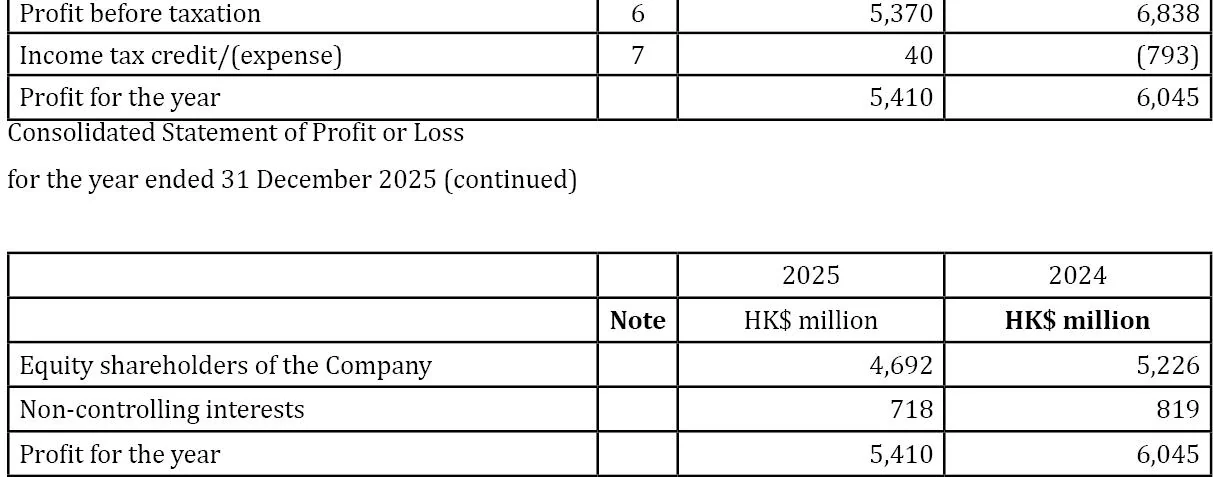
3. A statement split across two tables becomes one
InDesign Place
Keyline Studio draft
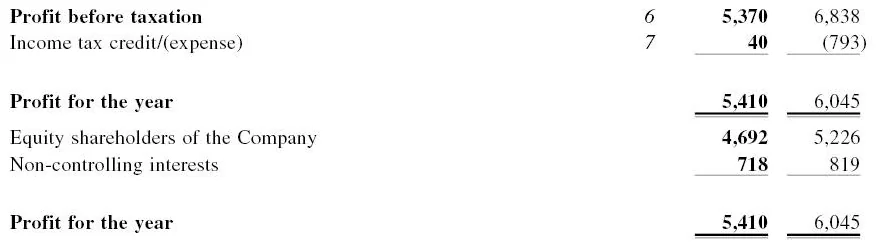
When a statement runs over a Word page, authors often start a second table with the title again and "(continued)". Place keeps two tables with loose lines between them. Keyline Studio joins them into one table with one set of column widths.
4. Wide tables are fitted the way a typesetter would
On Place, four of the ten figures in this segment table do not show. Keyline Studio fits the same table inside the text frame of a portrait page. Our built-in template fits in this order: type size down by up to 1 pt, then tracking, then column widths down to 90%. Only a table that still does not fit moves to a landscape page. Your template sets its own order and limits.
Fifteen more
The four above are a sample. In the same test set, Keyline Studio also:
- prints -18383 as (18,383), and a nil typed as a hyphen as an en dash;
- sets the current year in bold and notes in italic, even when the author bolded the wrong column;
- fills a missing figure the house way, as [•••];
- removes spacer columns;
- centres group heads over their columns;
- spaces blocks by rule, not by empty rows;
- joins a label split over several Word rows into one;
- hangs sub-items and note numbers;
- moves a title typed into a table out into a real heading;
- sets headings by what they are, not by whether they are bold;
- turns one-row tables into notes headings;
- sets footnotes as footnotes;
- spaces by house rules, not by the Enter key;
- breaks long web addresses cleanly after slashes and dots;
- sets Chinese in your Chinese font, with no line starting on a closing mark. In our test, Place showed every Chinese character as an empty box, because the Word file left its Chinese font to Word's theme.
A full draft in under 15 minutes
On an 81-page results announcement from our test set, the draft was ready in under 15 minutes: about 11 minutes to prepare the Word file and under 4 to build the InDesign document.
Every draft also checks itself. It lists, page by page, what a person should look at: a character the font cannot print, for example, or a table whose header or page break needs a look. That 81-page draft listed five.
"We already map Word styles on import"
Style mapping matches a Word style name to an InDesign style. It does not look at what a row is. It cannot tell a total from a line item, align figures on their digits, join a split statement, fit a wide table, or turn -18383 into (18,383).
Try it on one of your files
Send us one Word file. We return it as a Keyline Studio draft, set in your house template. Compare it page for page with what Place gives you.
Andre Hemker, ahe@nsi4.com
Case study
Read the case study.
More from the blog