 Alpha
AlphaKeyline Studio
A first proof, typeset from the manuscript.
Keyline Studio drafts for financial printers. A typesetter picks a client's Word file and a house template. Keyline Studio prepares the content, sets the pages in InDesign on the typesetter's own machine, and hands back the InDesign file, a PDF proof and a list of what to check.
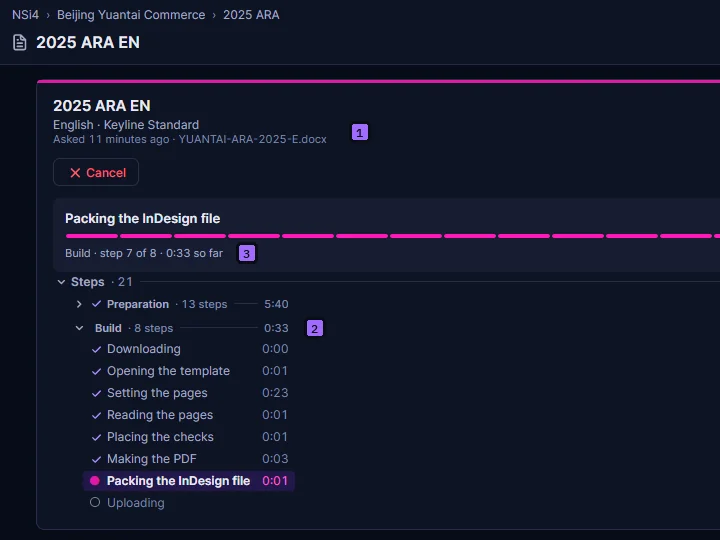
- The ask. A made-up company's Word file, its language and the template it is set in.
- The build. Each step in InDesign, timed as it runs.
- Live. The step under way, and how long it has taken so far.
01 Problem
Every filing is due in the same few weeks.
Printers typeset annual reports, results announcements, circulars and prospectuses against filing dates, usually in two languages. The dates bunch into a short season, so the same typesetters have to set more pages, faster, in the house style each client expects.
02 Constraints
InDesign stays, and a person signs off.
Printers work in InDesign, from their own house templates. A draft has to arrive as their own InDesign file, set in their own styles, not in a format of its own.
The printer's fonts, colour profiles and licences stay on its own machines, so the pages are set beside the typesetter, not in a cloud. And a first proof is where the typesetter's work starts: every place the draft is unsure of is named, with its page.
03 What We Built
A drafting engine that ends in InDesign.
Four parts carry a draft from the manuscript to a proof: the preparation, the build, the checks and the templates.
One draft
- PickA typesetter picks a client's Word file and a house template
- PrepareThe server reads the Word file and, with AI, plans the pages on the template
- BuildThe desktop app runs the build kit in InDesign on the typesetter's own computer
- CheckEach doubt becomes a check with its page, on a layer that does not print
- Hand backThe InDesign file, a PDF proof and a list of what to check
The parts
Prepare
The server reads the Word file and, with AI, plans the pages on the template: a build kit for InDesign.
Build
The desktop app runs the kit in InDesign on the typesetter's computer, then hands back the InDesign file and a PDF proof.
Checks
Each doubt becomes a check with its page, listed beside the draft and written on a non-printing layer of the InDesign file.
Templates
AI suggests how a house template's styles match the parts of a document, and a person can change any match before the template is saved.
04 Evidence
A draft, and what to check in it.
Every draft comes back as the InDesign file, a PDF proof and its checks, each check with its page.
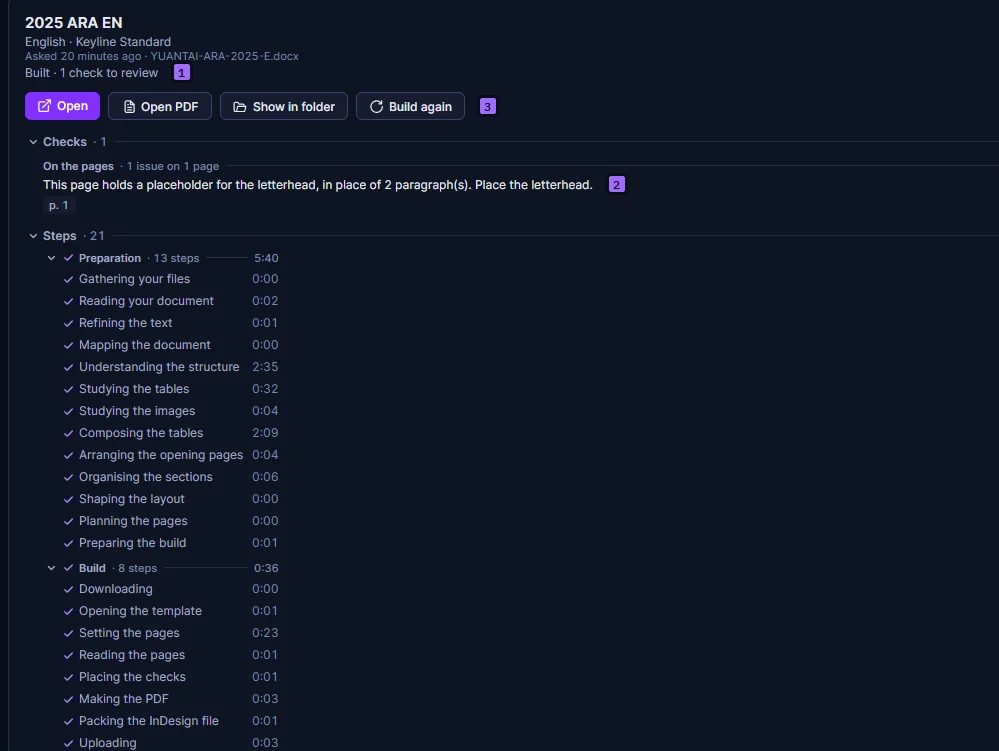
- Done. The draft, built on its template, with how long each step took.
- Checks. Each one in plain words, with its page.
- Files. The InDesign file and the PDF proof, ready to download.
The build, step by step
2025 ARA EN · 13 Oct 2026
05 Stack
What it runs on.
- Desktop app
- Avalonia · .NET 10 · Windows
- InDesign
- InDesign 2026 · ExtendScript over COM
- Server
- .NET 10 on Azure App Service · Azure SQL
- Sign-in
- Auth0
- Status
- Alpha · one document class: annual results announcements
Interest
Want Keyline Studio for your press?
Keyline Studio is in alpha. Tell us what you typeset, and in which languages, and we'll get in touch.